Embedded document viewing should feel like part of the application, not a handoff to an old browser extension or locally installed desktop program. For Windows-based ASP.NET and .NET projects, Doconut provides a document viewer SDK that can render business documents inside your web application.
This guide explains the architecture around a plugin-free viewing experience without presenting undocumented Doconut source code.
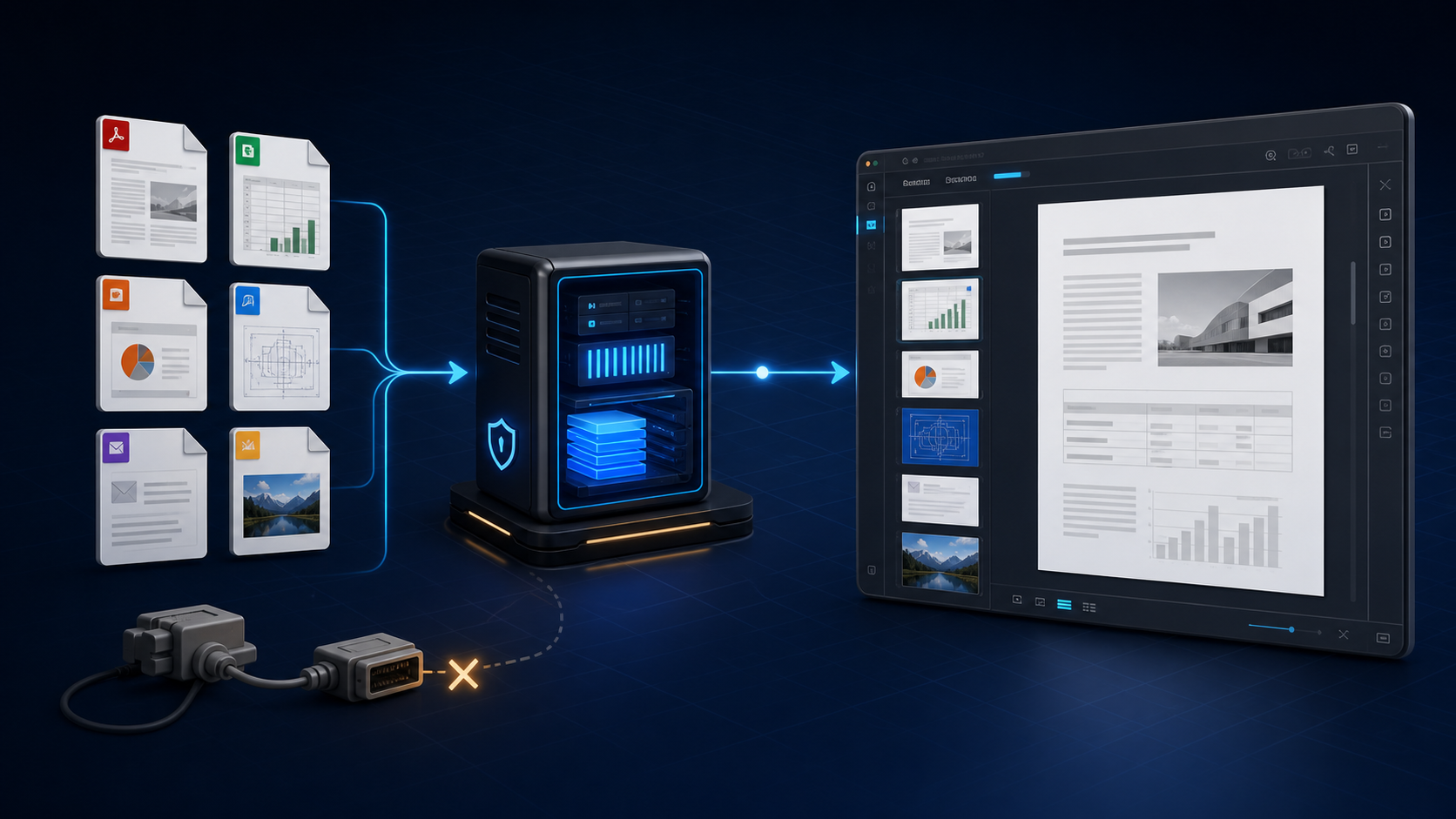
What “Plugin-Free” Means
A plugin-free viewer does not ask the end user to install technologies such as ActiveX, Flash, Silverlight, or a custom browser extension before opening a document.
That reduces several sources of friction:
- Users do not need local installation permissions.
- IT teams do not need to distribute and update a client-side plugin.
- The application keeps the viewing workflow inside its own interface.
- Legacy plugin dependencies do not become a condition for opening a file.
Plugin-free does not mean dependency-free. The server still needs the correct SDK, runtime, fonts, storage access, configuration, and license. The application also remains responsible for authentication, authorization, retention, and monitoring.
Why Server-Side Document Rendering Helps
Business documents are more complex than ordinary web content. Office files, CAD drawings, email messages, and high-resolution images each require format-aware processing.
A server-side .NET component can handle that processing while the web application presents the resulting viewing experience. This avoids asking each user to install the original authoring software.
Doconut is designed for this role. Its current product information describes support for document types including PDF, Office documents, CAD drawings, email files, and images. Confirm the exact formats and features required by your application on the Doconut Viewer page.
Plan the Viewing Workflow
A secure document request commonly follows these steps:
- The user selects a document using an application identifier.
- ASP.NET authenticates the request.
- The server verifies access to that specific document.
- The application resolves the protected storage location.
- The document is passed to the viewing layer using the supported integration method.
- The application records the result and releases temporary resources.
The client should never receive storage credentials, unrestricted server paths, or more document information than the authorized session requires.
Use Standard ASP.NET Security Boundaries
The viewing page should be protected like any other sensitive resource.
Standard .NET mechanisms can include:
- Authentication middleware
- The
[Authorize]attribute - Authorization policies and claims
- Resource-based authorization
- Dependency injection for storage and viewing services
- Structured logging with sensitive-data filtering
Authorization must be evaluated on the server. Hiding a toolbar action or route in the user interface does not prevent a determined client from requesting it directly.
Keep SDK Access Behind an Application Service
Avoid spreading viewer-specific calls throughout controllers and pages. A dedicated application service can:
- Resolve authorized document identifiers
- Open a controlled
Stream - Apply configuration for the installed SDK version
- Release file and stream resources
- Convert technical failures into safe application errors
- Record timings and sanitized diagnostics
This boundary makes the application easier to test and reduces the impact of future SDK upgrades.
Use the official Doconut download and documentation resources for package installation and version-specific API guidance.
Build a Useful Viewer Host
The application-owned viewer container should receive enough space for real documents. Avoid narrow cards and fixed desktop widths.
.viewer-workspace {
  display: grid;
  grid-template-rows: auto minmax(0, 1fr);
  width: 100%;
  min-height: 36rem;
  height: calc(100dvh - 4rem);
}

.viewer-host {
  min-width: 0;
  min-height: 0;
  overflow: hidden;
}
This is standard CSS for the surrounding page, not Doconut configuration. Do not target undocumented internal selectors or invent SDK options.
The page should also provide:
- A clear loading state
- A safe error message
- A visible document title
- A way back to the parent workflow
- Accessible application controls
- Enough room for wide spreadsheets and detailed drawings
Validate Documents Before Rendering
If users upload files, check:
- File size
- Extension and file signature
- Supported format
- Password or encryption requirements
- Business-specific restrictions
- Server-generated storage name
Do not construct server paths directly from the original filename. Store a safe application identifier and resolve it through an authorized server-side service.
Prepare the Windows Server
Rendering behavior can depend on the server environment. Confirm:
- Supported Windows and .NET versions
- Required fonts
- Temporary storage location and permissions
- Available CPU, memory, and disk capacity
- Maximum document size and concurrent sessions
- License configuration
- Cleanup procedures
Test representative customer documents on an environment that matches production.
Security and Privacy Checklist
Before release:
- Authenticate viewing requests where required.
- Authorize the user for the specific document.
- Keep storage paths and credentials on the server.
- Restrict temporary-file permissions.
- Define retention for originals, temporary data, and exports.
- Sanitize errors displayed to users.
- Exclude document contents and secrets from logs.
- Apply upload and concurrency limits.
- Keep the SDK and application dependencies updated.
Claims about compliance should reflect the complete deployed system and your organization’s processes, not a single UI component.
Test More Than the Happy Path
Your test library should include:
- Multi-page PDFs
- Large spreadsheets
- Detailed CAD drawings
- Presentations with uncommon fonts
- Email files with attachments
- Large images
- Damaged and unsupported files
- Unauthorized requests
- Concurrent viewing sessions
- Interrupted requests and application restarts
Confirm that failures do not reveal server paths, stack traces, or storage URLs.
Where Doconut Fits
Doconut supplies the embedded document-viewing capability inside a .NET web application. Your application supplies the surrounding security, storage, workflow, responsive layout, and operational controls.
That separation lets teams replace legacy plugin-dependent workflows without pretending that document handling becomes effortless or responsibility-free.
Explore the verified Doconut .NET document viewer SDK, then use the official download page for the instructions that match your selected version.
Conclusion
A plugin-free document experience reduces installation friction and keeps users inside your application. Build it on a server-authorized document flow, isolate SDK access, provide a spacious viewer host, and test real files under production-like load.
For Windows-based ASP.NET and .NET applications, Doconut can provide the document viewing layer while your team retains control of the application and document lifecycle.